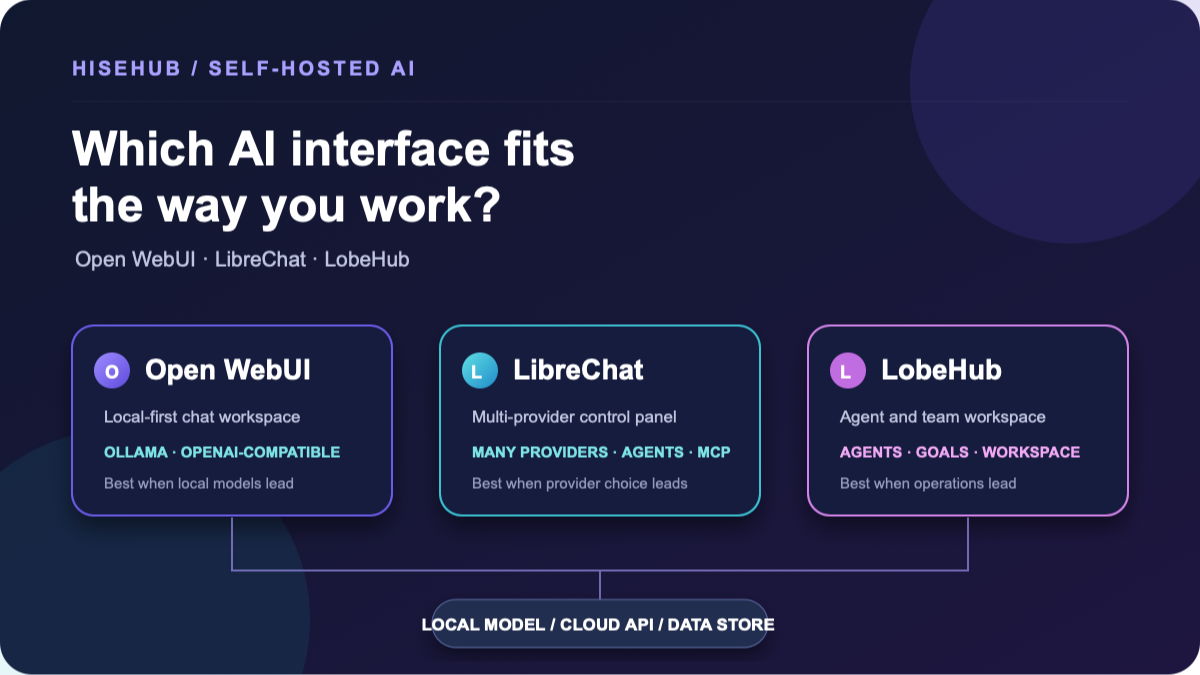
Open WebUI vs LibreChat vs LobeHub is not a single race. Open WebUI is usually the clearest first choice when a local model is the centre of your setup. LibreChat is the stronger fit when one interface must organize several provider accounts. LobeHub makes the most sense when you want an agent-oriented workspace, goals, and team operations—not simply a ChatGPT-style chat screen.
That answer is conditional because these projects occupy different layers of the stack. None of them includes a consumer ChatGPT, Claude, Gemini, or Grok subscription. None automatically makes a cloud API private. Each one is software you operate, connect to models, and back up.
This guide compares the current self-hosting surfaces of Open WebUI, LibreChat, and LobeHub. It is documentary research from official repositories and documentation checked on September 7, 2026—not a claim that HiseHub installed or load-tested all three.
Quick decision: which one should you start with?
On a small screen, swipe each comparison table horizontally to read all columns.
| Your main situation | Start by evaluating | Why | What could change the answer |
|---|---|---|---|
| You run local models on one computer or a small private server. | Open WebUI | It is closely aligned with Ollama and OpenAI-compatible backends, and its documented Docker path keeps application data in a persistent volume. | Choose a different project if agent scheduling, multi-provider administration, or a document-first workspace matters more than a local-first chat. |
| You switch between OpenAI, Anthropic, Google, OpenRouter, Ollama, or compatible endpoints. | LibreChat | Its configuration model is built around multiple endpoints, provider credentials, presets, files, agents, and access control. | Choose Open WebUI if you need a simpler local interface, or LobeHub if agents and workspace operations are the centre of the work. |
| You want agents, goals, shared projects, schedules, and an operational workspace. | LobeHub | Its current product direction treats agents as the unit of work and its official self-hosted stack is designed around a database, cache, object storage, and search. | Choose LibreChat or Open WebUI if that supporting stack is more operational complexity than you need. |
| You want a managed service with no database, reverse proxy, or upgrade work. | None of these by default | All three are self-hosting projects. A hosted deployment may exist around each project, but that is a different cost, trust, and data boundary. | Compare a managed product with the total cost of self-hosting before choosing on software price alone. |
The important word in this table is start. These recommendations are not rankings. A well-known repository can still be the wrong choice if its license, storage architecture, provider support, or maintenance model conflicts with your requirements.
What is actually being compared?
A self-hosted AI setup usually has at least four layers:
- Interface or workspace: the web application where people chat, attach files, create agents, and manage history.
- Model runtime: a local runtime such as Ollama, or a remote provider/API that generates the answer.
- Data services: databases, file storage, vector stores, search indexes, logs, and backups.
- Operations: authentication, secrets, domains, TLS, updates, monitoring, recovery, and user support.
Open WebUI is primarily a flexible AI interface that can sit beside a local runtime or connect to OpenAI-compatible services. LibreChat is a multi-provider chat and agent application with a configuration file and a database-backed deployment. LobeHub has moved beyond the older “LobeChat” label toward an agent operator and workspace product. Older LobeChat tutorials can therefore be useful historical context, but they are not automatically instructions for current LobeHub.
For this article, the version surface is deliberately explicit. The Open WebUI repository showed v0.11.3 as the current release checked on September 7. LibreChat v0.8.6 is a GitHub pre-release, not a stable baseline. It is used here as a documented reference point because the official release record is marked Pre-release; v0.8.8-rc2 was also listed as a pre-release on September 8, 2026. Treat the deployment and feature comparison as documentation-based, and check the current release channel before choosing a version. LobeHub v2.2.16 was the latest stable release found, while its default GitHub branch was canary. Release notes and deployment files can change after the review date.
At-a-glance comparison
| Dimension | Open WebUI | LibreChat | LobeHub |
|---|---|---|---|
| Primary role | Self-hosted AI interface and knowledge workspace | Multi-provider chat, agents, files, and tools | Agent-oriented workspace and operations layer |
| Local model path | Ollama and compatible backends are documented | Ollama and compatible endpoints are documented | Local and remote model connections are available, but the surrounding workspace is the larger story |
| Cloud provider choice | OpenAI-compatible endpoints; the backend controls access and billing | Many provider integrations plus custom endpoints | Multiple providers and local/remote endpoints; exact support depends on the selected release/configuration |
| Documents / RAG | Knowledge bases, retrieval/full-context modes, citations, and external vector-source options documented | File Search/RAG, file context, OCR and agent attachments documented | Document and knowledge-base features are part of the current workspace; deployment adds storage and search responsibilities |
| Multi-user controls | Roles, groups, per-model access, and identity-provider options documented | Authentication plus ACLs and role/group permissions for agents, files, MCP, and sharing | Authentication and workspace/agent permissions; read the current 2.x deployment and security guidance |
| Typical deployment shape | One main application container plus a chosen model/storage arrangement; scale-out adds more services | Docker Compose stack with application, MongoDB, MeiliSearch and RAG-related services in the recommended path | Official Compose reference includes app, PostgreSQL, Redis, RustFS and SearXNG; Elasticsearch is optional |
| Configuration style | Environment variables and admin settings | .env for server secrets/settings plus librechat.yaml for endpoints and advanced features |
.env plus database, cache, object-storage and app URL settings |
| Repository license signal | Open WebUI License with branding conditions; inspect the current file | MIT for the repository; providers and integrations remain separate | LobeHub Community License, based on Apache 2.0 with additional conditions |
| Operational burden | Lower for a single local chat, higher with RAG, SSO, multi-worker or external stores | Medium to high: provider configuration, database, search/RAG services, auth and updates | High relative to a minimal chat: database, Redis, object storage, search and agent/workspace operations |
The table is a map, not a promise that every row works without configuration. “Supports a provider” can mean an integration exists; it does not mean your account has access, the model has identical features, or the provider accepts the same files and tools.
Open WebUI: the local-model-first choice
Open WebUI is the natural first investigation when the sentence you keep saying is, “I already have a local model runtime; I need a good interface.” Its official Quick Start documents Docker as the recommended route for most users, with Python and Kubernetes options also available. The basic container stores application data under /app/backend/data; the documentation warns that this persistent storage is what keeps chats, users, and settings across container replacement.
That does not make Open WebUI local by magic. If it calls an OpenAI-compatible endpoint, the prompt follows that endpoint’s retention and logging rules. If a knowledge base uses a remote embedding model or external vector database, those parts become additional data destinations. The project’s RAG documentation distinguishes focused retrieval from full-context injection and explains that external knowledge sources are experimental and need compatible embeddings. Those are useful details because “I host the UI” and “all document processing stays on my machine” are different claims.
The practical strength is a relatively direct mental model: runtime, interface, persistent data, then optional extensions. Open WebUI documents roles, groups, per-model permissions and identity-provider integrations for larger deployments, but each added layer creates more secrets and more things to back up. Its current feature set is broad—knowledge, web search, tools and model wrappers—so a small local installation can grow into an operational system.
Read the license before you redistribute or remove branding. The current Open WebUI License includes a branding condition and describes a limited exception for deployments with no more than 50 end users in a rolling 30-day period. That is a summary of the project’s license text, not legal advice. Do not assume the same terms apply to older code or to third-party model files.
LibreChat: the multi-provider control panel
LibreChat is a better starting point when the interface is supposed to bring several model services together. The official materials list OpenAI, Anthropic, Google/Vertex, AWS Bedrock, Azure and other providers, along with local or compatible endpoints such as Ollama. In practice, that flexibility moves configuration work into the centre of the deployment: provider credentials, model names, custom endpoints, roles, file handling, and limits all need an owner.
The Docker documentation recommends Docker Compose for most local scenarios. The documented stack brings more than a web container: MongoDB, MeiliSearch and RAG-related services appear in the recommended path. LibreChat’s configuration guide separates server settings and secrets in .env from endpoint, model, interface, agent and MCP definitions in librechat.yaml. That separation is sensible, but it also means an upgrade backup is not just “save the container.” Preserve the database, configuration, uploaded files, and secret-management record.
LibreChat’s advantage becomes clearer for a small team. Its current documentation describes authentication, ACLs, roles/groups, file search, agents, MCP servers, shared resources and feature-level permissions. The first account becomes an administrator in an unscoped single-tenant deployment, and there are no default credentials. That is a safer starting point than a hidden shared password, but it is still your job to set registration, reverse-proxy, email, OAuth and recovery policies.
The repository license is MIT. That applies to LibreChat’s repository code under its license terms; it does not grant permission for a connected provider’s brand, model, API, data, or commercial service. A multi-provider interface can centralize navigation, not legal responsibility.
LobeHub: the agent/workspace choice
LobeHub needs the most careful naming check. The repository and current release material describe an agent operator and workspace that can organize agents, goals, projects, schedules and collaboration. Many search results and older guides still say “LobeChat,” because that was the earlier product identity. For a new deployment, follow the current LobeHub release and self-hosting files rather than combining an old LobeChat Docker command with a new server.
The official v2.2.16 release was the stable release used for this review. The repository’s default branch was canary, and it contained newer development activity. That matters when a README advertises a feature or when a third-party tutorial shows an environment variable: identify whether the claim belongs to the stable release, a cloud surface, or a pre-release branch.
LobeHub’s official Compose reference makes the operational trade-off visible. The app depends on PostgreSQL, Redis, RustFS object storage and SearXNG; an Elasticsearch path is optional. This is not a criticism—the stack reflects a workspace with search, files, agents and long-running operations—but it is not the same deployment class as a single chat container. Plan backups for the database, Redis state where relevant, object storage, environment secrets, and any external search index. Plan health checks and recovery order as well.
The LobeHub Community License is based on Apache 2.0 with additional conditions. Its current text describes commercial use of an unmodified service as allowed, while distributing a derivative work requires a commercial license. That distinction matters if you want to offer a modified, rebranded product. Read the full license and obtain legal advice for a commercial distribution decision. LobeHub’s security policy also says that only the latest 2.x line receives security fixes, so running an old 1.x deployment is not a harmless way to avoid migration work.
Where do prompts and files actually go?
A private-looking URL is not a data-flow diagram. The same interface can send a prompt to a local model in one conversation and to a cloud provider in the next. Files may take a separate route through text extraction, OCR, embeddings, a vector database, object storage, retrieval, and then the final model request.
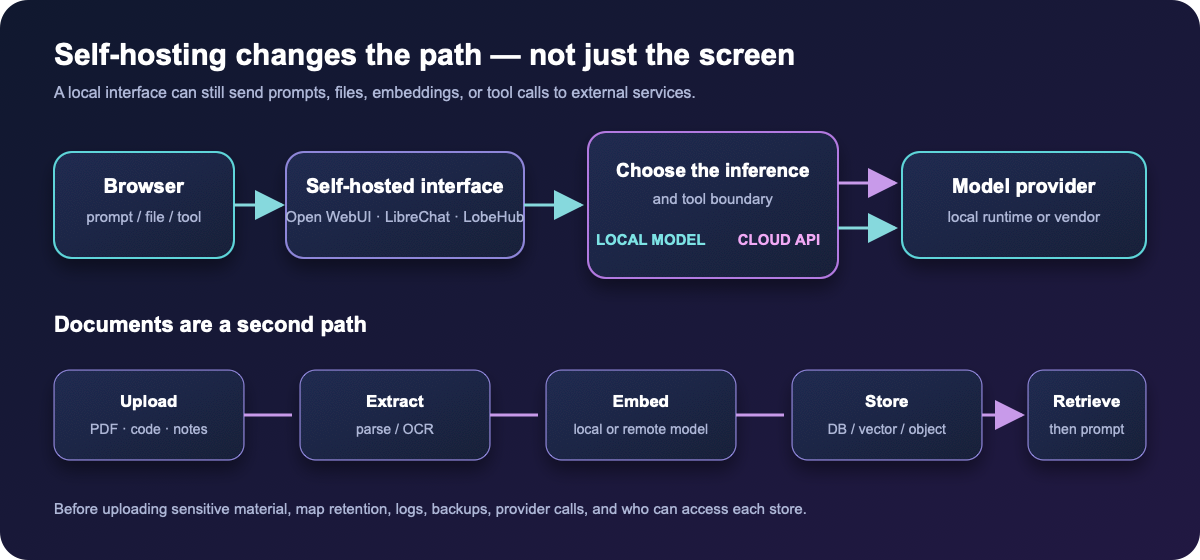
Use this checklist for each workflow:
- Inference: Is the answer generated by a local runtime, a vendor API, or a gateway that forwards to another service?
- Embeddings: Are document and query embeddings generated locally or sent to an external model?
- Storage: Where are chat history, uploaded files, extracted text, vectors, thumbnails, logs and backups stored?
- Tools: Can web search, MCP, code execution, email, GitHub or another connector receive the prompt or file?
- Access: Who can retrieve a document, share a conversation, view logs, or use an administrator’s provider credential?
Open WebUI’s documentation explicitly warns that external knowledge sources and matching embedding models matter. LibreChat’s MCP documentation explains per-user connections and OAuth flows. LobeHub’s deployment files expose object storage, database, cache and search as separate services. The common lesson is not that one project is private and the others are not; it is that privacy follows the configured path.
Deployment and maintenance: the cost people forget
“Free and open source” describes software availability, not the finished service. Before choosing, write down the following operational questions:
- What survives a container replacement? Identify volumes and bind mounts before the first update. For Open WebUI, the documented data volume is essential; for LibreChat and LobeHub, include databases, files, configuration and related services.
- What is the restore order? A database without its uploads, or uploads without the encryption/secret configuration, may not produce a usable restore. Document a test restore rather than merely keeping a backup file.
- How will you update? Pin a reviewed image or release, read migration notes, back up first, and keep the previous image/configuration available for rollback. Rolling tags are convenient but make the exact version less obvious.
- Who owns the credentials? Provider keys, OAuth secrets, database passwords, SMTP credentials and signing keys should be kept in a protected secret store or environment file, never in browser JavaScript or a public repository.
- What is exposed to the internet? Put the admin surface, databases, vector stores, object storage and model endpoints behind authentication and a carefully configured reverse proxy or private network. A working page is not evidence of a hardened deployment.
The maintenance burden grows in roughly the same direction as the feature surface. A minimal Open WebUI setup may have a small operational footprint. A LibreChat setup commonly adds database/search/RAG configuration. The current LobeHub Compose reference adds database, cache, object storage and search dependencies. These are planning comparisons from official deployment files, not fixed resource requirements or performance measurements.
A transparent monthly cost example
Here is a hypothetical planning example for a small self-hosted deployment. The numbers are assumptions so that the cost structure is visible; they are not HiseHub bills, vendor quotes, or promises about any project.
| Line item | Planning assumption | What it represents |
|---|---|---|
| Small VPS | $12 / month | Application, reverse proxy and supporting services where the selected stack fits |
| Backups | $4 / month | Separate storage and retention; actual needs depend on files and history |
| Cloud model/API usage | $25 / month | A hypothetical workload, not a claim about provider pricing or token efficiency |
| Operator time | 2 hours × $20 = $40 / month | Updates, checks, user support and recovery planning, valued only for comparison |
| Illustrative total | $81 / month | Planning total under these assumptions |
If you run a local model, the API line can fall, but hardware, electricity, storage, cooling and model-download time move into the budget. If you use a hosted subscription, the server line may disappear only if you stop self-hosting the interface. If you use a self-hosted UI backed by a cloud API, you pay both the infrastructure and provider lines. Use HiseHub’s AI API Cost Calculator for a request-based estimate, then compare it with the broader subscription and self-hosting trade-offs in AI Subscription vs API.
Do not infer that a particular interface saves tokens. The interface can change prompts, context handling, retrieval and tool calls, but model pricing and workload remain separate variables. Compare the same task, context, output and retention assumptions when you measure your own bill.
What would change the recommendation?
- Offline is non-negotiable: favour a local model path and verify that embeddings, OCR, search and updates do not quietly call remote services. Open WebUI may be the simplest starting point, but the chosen model and extensions still decide the final boundary.
- Several providers are essential: LibreChat’s endpoint model may reduce interface switching, but you still manage each provider’s account, billing, limits and terms.
- Agents need schedules and ownership: LobeHub’s workspace model may fit better, provided you can operate its supporting services and understand how agent credentials are scoped.
- Documents are the product: compare extraction quality, embeddings, vector storage, deletion, permissions and backups—not just whether a card says “RAG.”
- You cannot maintain a database: consider a managed service or a simpler deployment. A feature-rich stack that no one can restore is not a reliable private system.
- You plan to redistribute or sell a modified service: read each repository’s current license and branding rules before writing code or designing a commercial offer.
Before you commit: a practical validation checklist
This is a reader test plan, not a HiseHub test report. Run it in an isolated environment with sample data before putting real documents or customer credentials into any deployment.
- Connect one local model and one cloud provider, then record which requests leave the server.
- Upload a harmless PDF, a table and a code file. Check extraction, citations, full-context behaviour, deletion and re-indexing.
- Create two users. Confirm that chat history, files, agents, tools and shared links respect the intended permissions.
- Restart or replace the application container. Confirm that accounts, settings, chats and documents survive from the documented persistent stores.
- Take a backup, perform a versioned upgrade in a disposable copy, and rehearse rollback. Keep the exact image tag and configuration used.
- Review the current license, security policy, provider terms and any external tool permissions before opening the service to other people.
FAQ
Are these replacements for ChatGPT or Claude subscriptions?
No. They are self-hosted interfaces and workspaces. They can connect to local models or provider APIs when configured, but a consumer subscription does not automatically become an API balance, and the interface does not grant provider access.
Which is easiest for a beginner?
“Easiest” depends on the goal. Open WebUI is usually the shortest conceptual path for a local chat runtime. LibreChat is approachable if you accept Docker Compose and want multiple providers. LobeHub is better evaluated by someone who wants an agent/workspace system and is prepared to operate its supporting services.
Does self-hosted mean completely private?
No. It can improve control, especially with local inference and local storage, but cloud models, embeddings, web search, connectors, logs and backups may still receive data. Draw the full path before uploading sensitive material.
Why do some pages say LobeChat instead of LobeHub?
LobeChat is the older product name used in many guides and release references. Current LobeHub materials describe a broader agent operator/workspace direction. Treat older instructions as historical until they match the current release and deployment files.
Can I remove the branding and resell a customized version?
Do not assume that. The projects use different licenses and conditions. Open WebUI has a current branding condition, LobeHub’s Community License adds a derivative-work condition, and LibreChat’s MIT repository license does not cover connected providers or trademarks. Read the full license and get legal advice for a commercial derivative.
Our bottom line
Choose the layer before you choose the logo. Open WebUI is the strongest first investigation for local-model chat, LibreChat is the most natural comparison for a multi-provider control panel, and LobeHub is the specialist choice for agent operations and workspace collaboration. The winning deployment is the one you can explain, back up, update, restrict and restore.
See the full Self-Hosted AI Tools directory for the wider landscape, then verify the exact release and official documentation before installing. HiseHub’s AI Model Comparison can help with model capability questions, but model capability and interface choice are separate decisions.
Official sources and review boundary
- Open WebUI Quick Start, Backups, Knowledge, and RAG.
- Open WebUI License and v0.11.3 release.
- LibreChat Docker installation, configuration overview, access control, and MCP.
- LibreChat MIT License, LibreChat releases, and v0.8.6 release record.
- LobeHub v2.2.16 release, official Docker Compose reference, Community License, and security policy.
Reviewed September 8, 2026. This article summarizes public project documentation and release files. It is not a security audit, legal opinion, installation guarantee, or performance benchmark. Re-check the official sources before deployment because versions, integrations, licenses and hosting requirements can change.
If Open WebUI is installed but cannot reach Ollama, use the step-by-step connection troubleshooting guide before changing models or drivers.
Before upgrading a self-hosted chat interface, see how to back up and restore Open WebUI data safely, including chats, files, and the database.